Unlimited Free AI Agent: opencode + ox-alpha vs Claude, GPT
Run a full AI coding agent free and unlimited with opencode and ox-alpha - the open-source stack that competes with Claude Code, ChatGPT, Copilot, and Cursor.
Right now, you may be paying $200 a month to talk to a robot. This month, I paid $0 for the same job.
AI coding help kept getting more expensive all year:
- Claude Max: $100 to $200 every month.
- ChatGPT Plus: $20 per month, and extra charges start after that.
- GitHub Copilot: now bills by usage. Some developers saw their bills grow ten to fifty times in one month.
Do the math once: $2,400 a year for Claude Max, against $0 for this stack. That is not a discount. That is a different game.
Then, on August 20, 2026, a model with no known name started giving an AI coding agent experience with unlimited use for zero dollars. This post was written inside that setup. The agent wrote these words on my machine, for free.
No session limits. No token limits. No usage meter filling up in a dashboard. From now on, you code without watching the meter, because for once there is no meter.
If you follow along, this post takes about fifteen minutes to read. Building the portfolio takes another twenty minutes. By the end, you will have this exact stack running on your machine, and you will have watched it build a website while you guided it.
Know the agent you have been paying for
First, one simple definition. An AI agent is a language model connected to tools, running in a loop. It reads your files, edits them, runs commands, checks the output, and decides what to do next.
The difference in one example:
- A chatbot tells you how to fix a failing test.
- An agent opens the test, runs it, watches it fail, edits the code, runs it again, and repeats until it passes.
An agent has two parts:
- Harness: the software that holds the tools and runs the loop.
- Brain: the model that does the thinking.
Your subscription paid for both parts together. In August 2026, both parts became available for free, separately. Let us look at them one by one, starting with the half that was always going to be free.
opencode: the free harness
opencode is an open source AI coding agent under the MIT license. The facts:
- It runs in your terminal, as a desktop app, and as an IDE extension.
- It has more than 160,000 stars on GitHub.
- It connects to more than 75 model providers, including local Ollama.
- The software costs nothing. It is not a free trial and not a limited free plan.
Here is how it compares with what you may be paying for today.
| Tool | License | Price | Model lock-in |
|---|---|---|---|
| opencode | MIT open source | Free | None: 75+ providers |
| Claude Code | Proprietary | $100-200/mo (Max) or API | Anthropic models only |
| OpenAI Codex | Proprietary | ChatGPT Plus $20/mo or API | OpenAI models only |
| GitHub Copilot | Proprietary | $10/mo base, usage billing after that | Microsoft-hosted models |
| Cursor | Proprietary | $20/mo | Any major provider, needs VS Code fork |
Look at the lock-in column. With opencode, your history, settings, and habits stay safe even when you change the model provider, because the tool was never tied to one vendor.
Two built-in features make daily work easy:
- Plan mode turns off all editing and only suggests a plan. Press Tab to switch to Build mode, where changes really happen.
/undoremoves a change and gives back your original prompt, so you can fix it and send it again.
Tip
Run /init inside a project once. It scans the repository and writes an AGENTS.md file that describes the structure and rules. Commit that file. Every later session starts smarter because of it.
So the harness problem is solved: good software, zero cost, no strings. That leaves one question. Surely the brain still costs money. Models are the expensive part. Everybody knows that.
Do they?
Keep that doubt with you. It is exactly where I stood when I started digging. The next section answers it, and the answer is the reason this post exists.
ox-alpha: the free brain with unlimited access
On August 20, 2026, OpenRouter listed a new model called Ox Alpha with no developer name attached. Minutes later, opencode started serving the same model directly as Ox Alpha Free (opencode/x-preview-f-free).
The published specifications look like a top model:
- Context window of 1,048,576 tokens, enough to hold most real repositories at once.
- Maximum output of 131,072 tokens per turn.
- Input accepts text, images, and video.
- Function calling and structured JSON output are supported.
- Price for input, output, and cached reads: $0.
How does it compare with the models people call top today?
| Model | Same-run DeepSWE (10 tasks) | Official DeepSWE leaderboard | Price today |
|---|---|---|---|
| ox-alpha (preview) | 8/10 passed | Not listed yet | $0 |
| Claude Opus 5 | — | 73.6%, current leader | Paid API or Max plan |
| Claude Fable 5 | 6.5/10 | — | Paid API or Max plan |
| GPT-5.6 Sol | 5.2/10 | 72.7% | ChatGPT Plus $20/mo or API |
Read that table with both eyes open. My first reaction to the launch was doubt. Then a developer named Ben Davis ran ox-alpha through DeepSWE, and it beat both top models in the same run. A bigger independent run of all 113 tasks reported about 80 percent. But the official leaderboard does not list ox-alpha at all, Artificial Analysis has published no score, and the builder is unknown. So: the published specs are excellent, the community results are strong, and the official proof is still missing. Try it seriously, but do not call it a proven champion yet.
Now the word that matters most: unlimited. Here is exactly what opencode announced:
- Usage during the preview window is near unlimited.
- Total capacity is 100 trillion tokens per day across all users.
- On OpenCode Go, the paid tier, ox-alpha requests do not count against your limit while the window lasts.
I have used it through full working days on this machine, including this post. No rate limit ever stopped me. This is the first time a model at this level came with unlimited free access.
Note
Note: there is no announced end date for this unlimited access. No deadline, no notice, nothing published. So the plan is simple: use it fully until they say otherwise, and keep the exit path ready (75 other providers) in case they do.
One privacy fact to remember:
- OpenCode's Zen documentation says: zero retention, no training on your prompts.
- OpenRouter's page says: prompts are kept by the provider but not used for training.
Until the two match, trust the stricter one. The catches section explains what that means in practice.
Install it first: one command on any OS
Time to make it real. You need Node 18 or newer, or just curl, and a terminal. No credit card is needed anywhere in this process. Pick your operating system below.
curl -fsSL https://opencode.ai/install | bashOn Arch Linux, pacman installs the same tool:
sudo pacman -S opencodeCheck that it installed, whichever way you used.
opencode --versionYou should see a version number. That is the whole install.
Do you prefer clicking over typing? Get the desktop app from opencode.ai. Everything in the next section works the same on it.
Two ways to use it: desktop app or terminal
Both ways open the same agent, the same models, and the same AGENTS.md rules. Nothing you learn in one is wasted in the other.
Way one: the desktop app
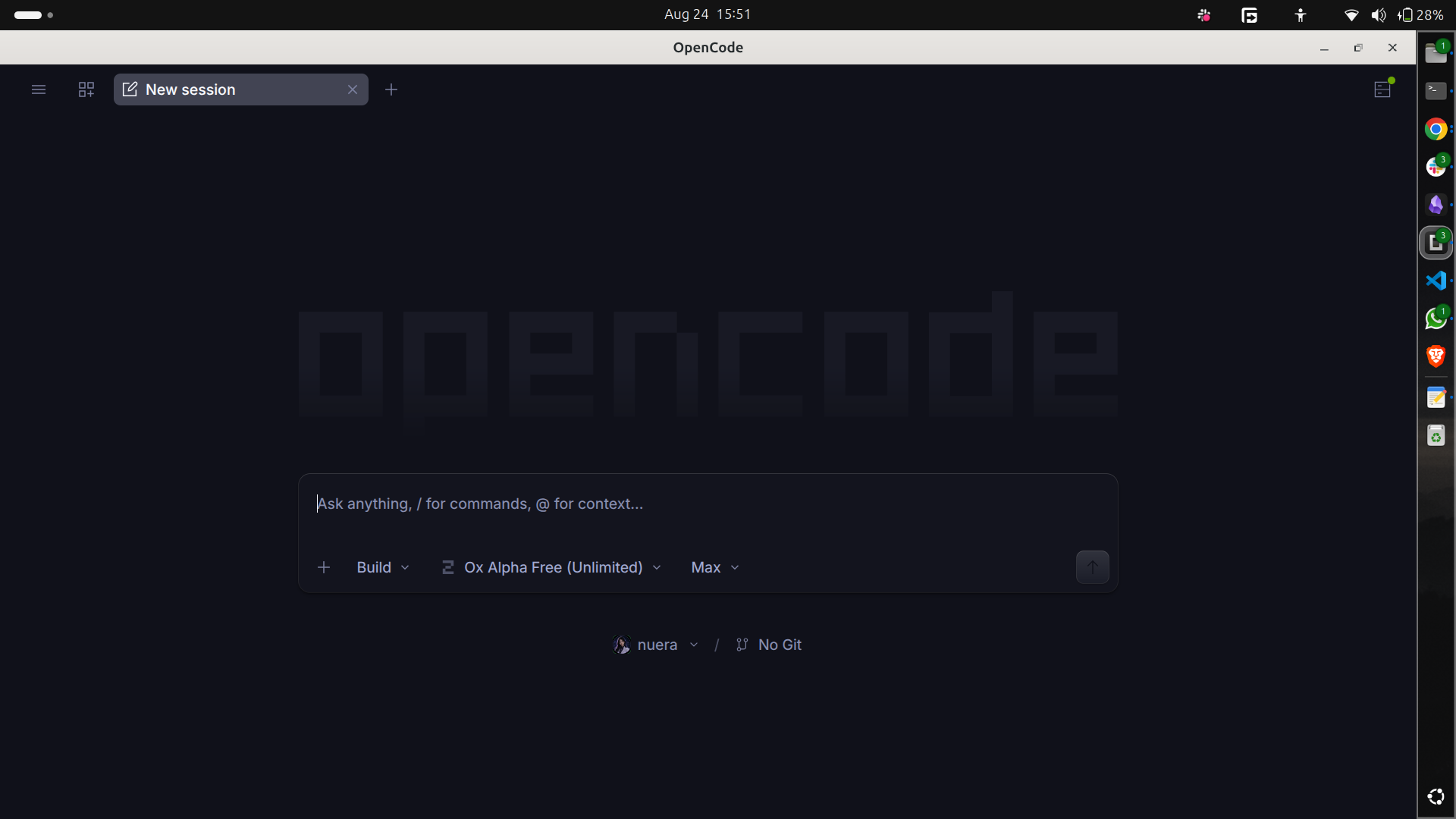
Open the app, pick any project folder on your machine with the folder picker, and start talking. You do not need cd or a terminal. The prompt box, /models, /init, and the @ key all work the same way. If your day moves between three projects in three folders, clicking is faster than typing paths. Open it and you will see the desktop agent like this:
Way two: the terminal
Same agent, different window.
Step 1. Go to any project folder and start it.
cd ~/projects/my-app
opencode
A terminal UI opens. Almost everything happens through the prompt box at the bottom.
Step 2. Pick the free brain. Type /models and choose Ox Alpha Free from the list. You will see the model name in the corner of the screen. No API key is asked anywhere, because none is needed during the preview window.
Step 3. Teach it the project once. Type /init, and it writes an AGENTS.md file that captures your repository's structure and rules. Commit that file.
Step 4. Talk to it like a junior engineer who can touch everything. Point it at files with the @ key:
How is authentication handled in @src/middleware/auth.ts?You should get an answer that quotes real code from that file. When the answer quotes functions you wrote yourself, doubt disappears.
Whichever way you picked: Ox Alpha Free selected, model name showing, no API key needed. That was the hard part, and it took minutes. Now for the fun part.
Watch it build your portfolio
Reading about agents gives you opinions. Building with one gives you understanding. Do this through the desktop app, so you can point, click, and watch. The goal: a personal portfolio site with a resume section, a real Next.js codebase you can keep growing. It takes about twenty minutes, and most of it is just watching.
Step 1. Make an empty folder named my-portfolio anywhere you like, using your file manager.
Step 2. Open that folder in the opencode desktop app with the folder picker. Everything the agent writes will land there.
Step 3. Press Tab to enter Plan mode, describe the product, and paste your resume into the same prompt:
Build my personal portfolio site as a Next.js app styled with
Tailwind CSS: dark theme, clean typography, fully mobile-responsive.
Sections:
1. Hero with name and role
2. About paragraph
3. Projects: three cards rendered from a projects array kept in a
   separate data file
4. Resume section built from the resume text below: turn it into a
   single resume data object next to it, render experience and
   education from it, and add a Print / Save as PDF button using
   window.print()
5. Contact footer with email link

My resume:
[paste your full resume text here / Upload screen shots of resume]
The prompt shape matters: you said what you want, not how to build it. You named the data objects you will edit later. And you pasted the resume itself, so the data goes in exactly right, not paraphrased.
Step 4. Adjust the plan until it matches what you want. Then press Tab again for Build mode:
Go ahead. Scaffold it, install dependencies, build it, then start
the dev server and verify every section renders on desktop and
mobile before you report back.
Notice what you did not do: open an editor, touch CSS, or fight with responsive breakpoints.
Step 5. When it reports done, open http://localhost:3000 (run npm run dev first if needed). Expected result:
- Dark site, your name at the top.
- Three project cards.
- A resume timeline built from the resume you pasted.
- A working print button.
You made a folder, pasted a resume, and approved a plan. Your resume page is ready, printable, and yours. Edit the projects array or resume object in their data files, save, and watch the browser update live.
One lesson that saves you later. Ask for a light-mode toggle. If you decide you hate it, type /undo. The change disappears and your original prompt comes back.
Tip
Try extending it through the agent: ask for a contact form that opens the visitor's mail app with the subject and body already filled. Then deploy to Vercel and point a domain at it. Your portfolio cost zero dollars in model fees, and that is a better origin story than most.
The catches, before you cancel anything
Nothing this good comes without fine print. Saying otherwise would make this an advertisement, not a review.
First catch: the clock. Stealth previews end when the provider decides. Nothing published says what the price will be after that. Enjoy it while it lasts, and remember the lesson underneath: if the brain becomes expensive again, opencode connects to 75 other providers without reinstalling anything. The tool survives the model.
Second catch: privacy. Until the two retention statements match, treat everything you send as saved somewhere you cannot check:
- No API keys in prompts or pasted files.
- No customer data.
- No unreleased business plans.
- No passwords or credentials.
Use it freely for side projects and public code. Free tokens are not a security policy.
Third catch: honesty about where paid models still win. If your work has compliance rules that need vendor contracts, an anonymous model fails that test no matter what the benchmarks say. If your team runs eight-hour agent sessions on huge codebases every day, a proven flagship with a service guarantee is worth paying for. My position can change with new evidence: strong enough to switch my daily tool, not strong enough to bet a business on.
This brings us back to where we started. You never paid $200 a month because intelligence costs that much. You paid for access, and access became free in August 2026. The better ending is what you build now that the meter is gone: my portfolio, these posts, my daily refactors, all running on a stack that costs zero dollars a month.
Want to see the agent earn its keep on a real bug first? I handed it a broken repo at eleven at night and watched it fix itself, plus every other free model hiding in OpenCode Zen.
Your turn: what will you build first when the meter stops running?
One honest disclosure: every word above was produced inside the setup it describes. ox-alpha running opencode on my machine wrote it while I guided it. The tool works. That is the review.
🎯 What is in my hands now!
- I have a working AI agent running free on my machine, no subscription attached.
- opencode is the free harness, ox-alpha is the free brain, and both cost zero.
- This free brain competes with Claude and GPT on real coding benchmarks.
- Unlimited access is live right now, so I use it until they say otherwise.
- I built a full portfolio site with it; secrets stay out of the prompts.
“Focus on the positive aspects of life.”
— Gurudev Sri Sri Ravi Shankar Ji.